Look things up
when there's no signal
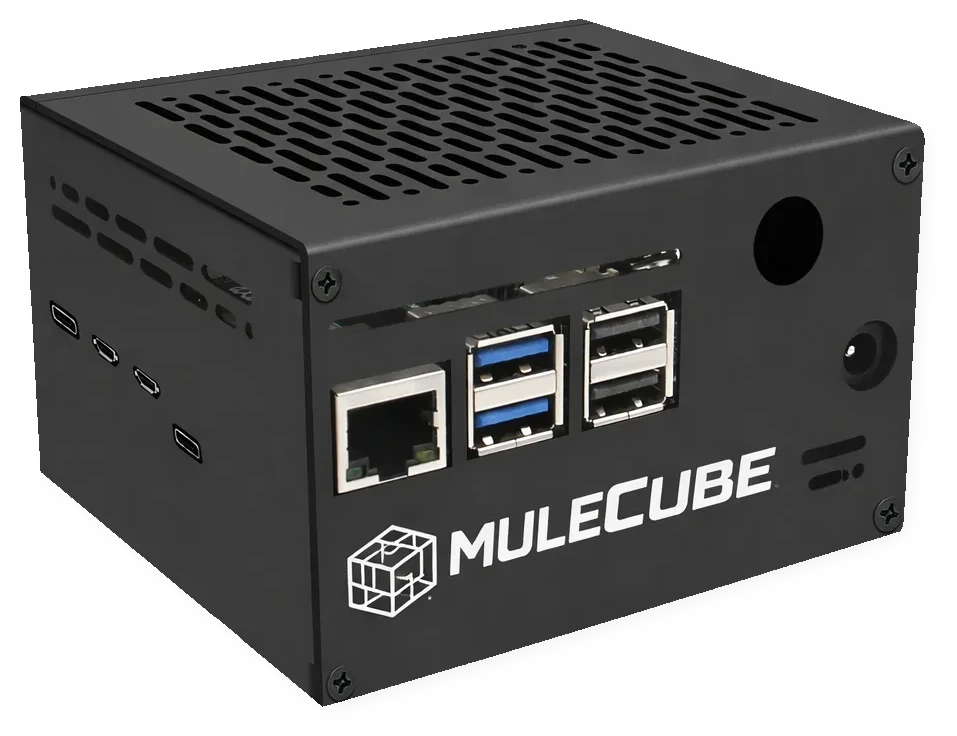
A pocket-sized offline server with Wikipedia, maps, AI, and 30+ tools — runs on battery, works anywhere.
- 6 million Wikipedia articles + medical & survival guides
- Offline maps for navigation without data
- Private AI assistant that never phones home
- 10+ hours battery, solar-compatible, charges your phone
- Palm-sized (100 × 91 × 63mm) — smaller than a coffee mug
Wait — WiFi without internet?
Yes. Here's the simple version:
The box creates its own WiFi network
Your phone connects to the box
Everything runs inside the box
No cell towers. No internet connection. No cloud. Just your phone talking directly to a small computer in your bag.
About the AI
Three local models. No internet. No cloud. Completely private.
What it does
- Answer questions and explain topics
- Help draft documents and emails
- Summarize and analyze text
- Translate between 49 languages
What it doesn't do
- Browse the web (it's offline)
- Access real-time information
- Match GPT-4 on complex reasoning
- Generate images
Response speed by model
- Cube 8: ~5-15 sec/response
- Cube 16: ~3-10 sec/response
- Cube AI: ~1-3 sec/response
Think of it as a knowledgeable colleague who happens to be offline — helpful for research and drafting, not for live web searches.

How It Works
Three steps. No tech skills required.
Turn It On
Press the button. Ready in under 60 seconds.
Connect Your Phone
Join the "MuleCube" WiFi — just like connecting to any hotspot.
Look Things Up
Open your browser. Wikipedia, maps, AI — all running inside the box.

Encyclopedia & Books
6 million Wikipedia articles, medical guides, and 5,000+ classic books. All stored on the device. Powered by Wikipedia via Kiwix.

Maps & Navigation
Detailed street maps and hiking trails. Get directions without cell service. Powered by OpenStreetMap.

AI Assistant
Ask questions, get explanations, write drafts. Runs entirely on the device — completely private. Powered by Ollama.

Radio Messaging
Send messages over kilometers without cell towers. Add a small radio and communicate off-grid. Powered by Meshtastic.

Satellite Messaging
Send messages from anywhere on Earth. No cell towers needed — just sky. Works with Iridium satellite network (Sat models).

Open Source
Full source code on GitHub. No lock-in, no subscriptions, no cloud dependency. Build your own or modify ours.
Your Data Stays With You
Everything runs locally. Nothing leaves the box unless you want it to.
Your searches stay on your device. Your files stay on your device. It's your knowledge server — not ours.
Built For
People who refuse to be helpless when the connection drops
Camping & Travel
Look things up when there's no signal
Sailing
Charts, reference, and communication at sea
Emergency Prep
Knowledge and communication when the power goes out
Humanitarian
Disaster response, field clinics, NGO deployments
Education
A library for schools without reliable internet
Field Research
Reference and AI assistance in remote locations
What Early Users Say
Real feedback from beta testers and early adopters
Finally, a device that makes sense for backcountry trips. I used it to identify plants and check weather patterns when we lost cell signal. The offline maps alone are worth it.
ExpeditionsWe keep it on the boat at all times now. Having Wikipedia and medical references available offshore gives us peace of mind. The Meshtastic feature is perfect for communicating with other boats.
SailingI bought it for emergency prep, but honestly I use it daily now. Having a completely private AI assistant that works without internet is something I didn't know I needed.
Emergency PrepUsed it at our scout camp where there's zero coverage. The kids could still do their research projects and we had access to first aid references. Exactly what we needed.
CampingFind Your MuleCube
Answer 3 quick questions and we'll recommend the best model for you
Where will you primarily use it?
How important is satellite messaging?
What's your budget?
Mule Cube 8
Perfect for weekend camping and emergency prep with all essential features.
View DetailsQuick Compare
Not sure which one? Here's the short version.
DIY
Build your own from scratch. Full source code and instructions.
Best for: makersSD Card Kit
Pre-loaded 512GB card. Plug into your own Raspberry Pi 5.
Best for: Pi ownersCube 8
Ready to use. Wikipedia, maps (Europe), AI — all offline.
Best for: most peopleCube 16
More memory for larger AI models and heavier use.
Best for: power usersCube AI
Dedicated AI chip. Real-time vision, speech-to-text.
Best for: AI enthusiastsCube Sat
Satellite messaging from anywhere on Earth. Includes radio.
Best for: remote expeditionsUltimate
AI acceleration + satellite. Everything in one device.
Best for: no compromisesMaps include Europe by default. Other regions available on request.
Common Questions
How do I connect to it?
Turn it on and connect to the "MuleCube" WiFi from your phone, tablet, or laptop. Go to http://mulecube.net/ in any browser. No app needed.
Does it need internet to work?
No. Everything runs on the device itself. Wikipedia, maps, AI — all stored locally and work completely offline.
How many people can use it at once?
Up to 10 devices can connect at the same time. For heavier use, consider the Cube 16 with extra memory.
Can I add my own content?
Yes. It's a full Linux computer. Add your own maps, books, documents, or install additional software. Full root access included.
Is it waterproof?
No. Keep it dry. For marine use, put it in a waterproof bag or enclosure. The device runs cool enough for a sealed container.
What's the warranty?
2-year warranty on all hardware. Email support with 48-hour response time on business days.
Ready to go off-grid?
MuleCube is for anyone who refuses to be helpless when the connection drops.